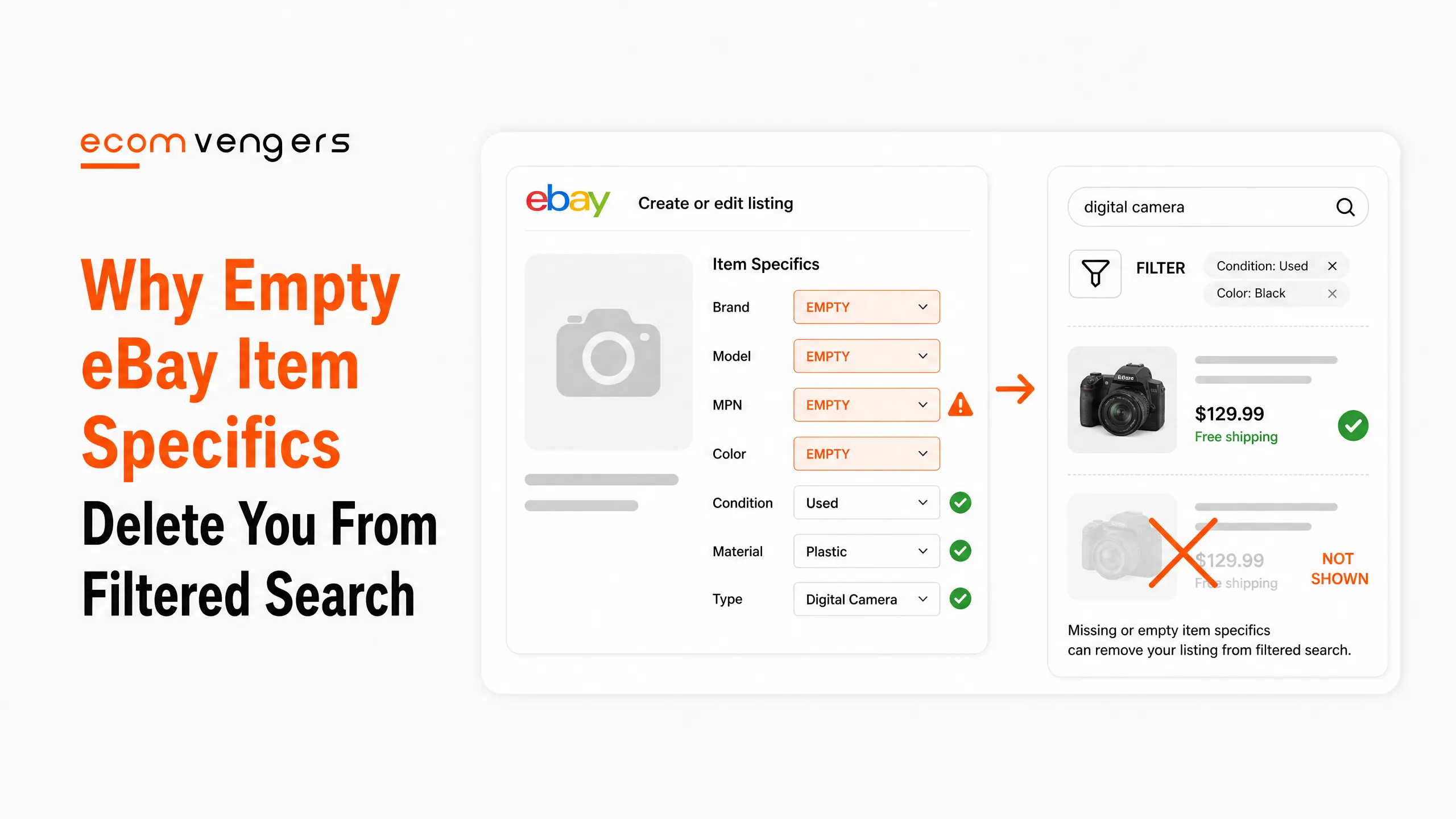
An empty field does not weaken your listing. It removes it.
eBay puts it in one sentence. Buyers use item specifics to filter their search results, and your item will only appear in those filtered results if you added the matching item specific.
Not lower down. Absent.
A buyer who ticks a size, a colour or a brand has just built a shortlist you are not on, however good the listing is.
Here is how eBay item specifics work, and the four labels that tell you which ones matter.
Key Takeaways
- A missing specific removes you from that filter. eBay states this outright.
- They reach beyond eBay. eBay names Google Shopping and external search results.
- Filtering matters most on mobile. eBay calls that out specifically.
- There are four labels. Required, Required Soon, Recommended and Additional.
- Required is not optional on a revision. Any new or revised listing has to carry them all.
- Required Soon comes with a date. Hover the note to see when enforcement starts.
- Recommended is demand data. eBay picks those from buyer searches, not from tidiness.
- You get a 30 day search signal. eBay shows which specifics buyers searched recently.
- A meter shows completeness. The lightning bolt fills as you fill fields.
- Seller Hub finds the gaps for you. Tasks, Quick Filters and a bulk editor.
- You can fix them in bulk by spreadsheet. Download, edit, upload.
- Variations are built from item specifics. One listing, many sizes.
What eBay Item Specifics Actually Are
Structured fields describing the object, sitting underneath the title where most sellers never look.
eBay defines them as descriptive keywords that tell a buyer about your item, and names brand, size, length, width, height, type, colour and style as examples. Which ones appear depends on what you are selling.
Together with product identifiers, eBay calls them the most important way to help buyers find what they are looking for.
Most important. Not helpful, not recommended.
The filter rule is the whole thing
This is the sentence worth reading twice.
Your item only appears in a filtered search result if you added the matching item specific. There is no partial credit and no ranking penalty, because ranking never enters into it.
The buyer applied a filter, and the filter is a question your listing did not answer.
That is a different failure to ranking badly, and it needs a different fix. We cover the ranking side in how eBay Best Match works.
And they travel outside eBay
eBay lists three benefits, and the second one surprises people.
Item specifics improve visibility in eBay search results, increase your chances of being found on Google Shopping and external search results, and increase the chance of buyers finding you when they filter, especially on mobile devices.
So the fields feed Google as well. A structured attribute is exactly what a shopping feed wants, and prose in a description is not.
The mobile point matters too, because filters do far more work on a small screen than a wall of results does.
Why Your Description Cannot Replace eBay Item Specifics
Sellers write the missing information into the description and assume it counts. It does not.
A filter is a structured question. It asks whether the colour field says Blue, and it reads a field rather than a paragraph.
Writing the item is blue in your description answers a human and not the filter. The buyer never reaches the description, because your listing was excluded before they got that far.
Both matter, and they do different jobs. The fields get you into the shortlist, and the description closes the sale once you are on it.
Where product identifiers fit
eBay pairs them with item specifics rather than treating them separately.
It states that together with product identifiers, item specifics are the most important way to help buyers find what they are looking for. Codes like a brand, an MPN or a barcode let eBay match your item to a catalogue entry it already understands.
Where a genuine identifier exists, supply it. It is the shortest route to a complete listing, because the catalogue fills in a great deal on your behalf.
The Four Labels eBay Uses
They are not a tidiness scale. They are a priority order, and eBay says what each one means.
Required
Critical to identifying the item, in eBay’s words, and non negotiable.
You have to fill in every Required item specific for any new or revised listing. That second word catches people. Editing an old listing pulls it into the current rules, so a revision can suddenly demand fields that did not exist when you first listed.
That is a reason to revise deliberately rather than to avoid revising.
Required Soon
A deadline you can see in advance, which is unusually generous.
eBay adds new Required specifics periodically, based on what buyers are searching for. Where a field is about to become mandatory, you see a note as you list, and hovering over it tells you when.
Treat those as already required. The category is telling you where buyer demand moved.
Recommended
This is the label sellers skip, and it is built from demand data.
eBay recommends certain specifics based on buyer demand data and popular searches, and asks you to add as many as you can. These are the fields buyers are actively filtering by right now.
Skipping a Recommended field is choosing to be invisible to the buyers most likely to want your item.
Additional
Useful rather than urgent, and it pays in a way that is easy to miss.
eBay says these help buyers know more about your item, and that completing them could save you from having to answer questions about it.
Every question you do not answer is a message you have to write and a buyer who might not wait for the reply.
Key point: Required protects you from an error message. Recommended is the one that earns money, because it is drawn from what buyers actually searched. Most catalogues we audit are clean on the first and hollow on the second.
The Signals eBay Gives You While Listing
Two of them, and both are on screen while you type.
The 30 day search ranking
eBay shows you what buyers have been searching for, and how recently.
As you list, it gives guidance on which item specifics your buyers are searching for, based on the number of searches over the past 30 days. Completing those helps visibility, particularly when buyers use the left hand navigation filters.
That is free keyword research sitting inside the listing form, and almost nobody reads it.
The lightning bolt meter
A completeness gauge, and a useful proxy for the work left to do.
eBay describes it plainly. The lightning bolt meter fills up to indicate how complete your item specifics are.
Treat a part filled meter as an unfinished listing rather than a finished one with a decoration next to it.
How Do You Find Listings Missing eBay Item Specifics?
eBay built the tools, and they sit in Seller Hub rather than anywhere clever.
Start with the Tasks module
On the Seller Hub Overview page, a task appears when you have listings missing required item specifics.
Clicking it takes you straight to those listings, which removes the excuse that you did not know which ones they were.
Then use the Quick Filters
Your Active Listings page carries a filter for each label.
Where listings are missing Required, Required Soon or Recommended item specifics, a corresponding Quick Filter appears. That gives you three work queues in the order they should be worked.
Run the Recommended queue too, not just the Required one.
Fix several at once from Active Listings
Select multiple listings and choose Add item specifics.
eBay loads them into a pop up window where you cycle through each one adding what is missing. For a few dozen listings that is faster than opening each in turn.
Fixing a Large Catalogue in Bulk
Past a few dozen listings, do it in a spreadsheet.
The Download and Upload file tool on the Active Listings page gives you an Excel file of every active listing missing Required, Required Soon or Recommended item specifics.
You edit the file following its own instructions, then upload it to apply the changes across many listings at once.
eBay also points at a third party option, Optiseller Aspect Finder, for identifying and updating listings with gaps.
Work the spreadsheet in the right order
Sort by category before you start typing.
Item specifics are defined per category, so all the listings in one category share the same fields and the same permitted values. Filling a hundred rows of one category is fast, and jumping between categories is slow.
Use eBay’s own dropdown values wherever they exist, because those are the values the filters are built from. A free text answer that means the same thing is not the same thing to a filter.
This is the bulk work our eBay SEO service spends most of its time on, and it is the least glamorous part of the job.
Variations Are Built From Item Specifics
The same fields that describe an item can also group several of them into one listing.
eBay explains it with shoes. One listing can carry multiple variations for different sizes, using item specifics to describe how the items relate to each other.
You select from a list of variation details such as size, colour or width.
The advantage is that one listing accumulates all the views, watchers and sales history rather than splitting them across five.
The rule that decides whether you can
Items grouped under one listing need to be closely related.
That is eBay’s own wording, and it rules out the temptation to bundle loosely similar stock under a single high performing listing.
Different sizes of one shoe are variations. Different shoes are different listings.
If you see an attribute error
eBay has been retiring variation details that no longer work as single listings.
Where one is no longer valid, editing the listing produces a message telling you the attribute is not valid for this variation and asking for a valid one.
eBay frames that change as clarifying which items belong together and which get noticed better as separate listings. Read the error as advice rather than as an obstacle.
eBay Item Specifics Before and After
Same shoe, same photographs, same price. Two very different listings.
| Field | Before | After |
|---|---|---|
| Brand | Empty | Selected from the list |
| UK Shoe Size | In the title only | Selected from the list |
| Colour | Navy, typed by hand | Blue, from the dropdown |
| Style | Empty | Selected from the list |
| Department | Empty | Selected from the list |
| Material | Empty | Selected from the list |
The before column is not a bad listing. It is a normal one, and it is invisible to five separate filters.
Read the colour row again
That row is the one sellers argue about, and it is the clearest example of the rule.
Navy is more accurate than Blue. It is also not a filter value, so the listing sits outside the group of blue shoes a buyer just asked to see.
Choose Blue in the field and write navy in the title. You get the filter and the accuracy.
And the size row
A size in the title is not a size in the field.
Titles feed the keyword match, which is a different mechanism to the filter. A buyer typing size 10 boots may find you, and a buyer ticking Size 10 in the sidebar will not.
Most shoppers do both, in that order.
What Complete eBay Item Specifics Look Like
Four habits, and none of them takes long once the catalogue is clean.
Use the dropdown, not your own words
Filters are built from eBay’s values rather than from yours.
Typing navy into a colour field that offers Blue puts you outside the Blue filter. The buyer filtering for blue shoes never sees a navy pair, and you never learn why.
Pick the closest offered value and use the title or description for the nuance.
Fill fields you think are obvious
Obvious to you is empty to a filter.
Brand is the classic. Sellers leave it blank on an item whose brand is written across the photograph, and drop out of every brand filter in the category.
The field is not asking whether a human could work it out.
Check specifics when you check the category
The two are connected, because the fields you get depend on where you list.
A listing in a broad category is offered fewer and vaguer specifics than the same item in a precise one. Fixing the category often fixes half the specifics problem by itself.
Our guide to eBay listing optimization covers the category side in more detail.
Re-run the queues quarterly
Because the requirements move under you.
eBay adds new Required specifics periodically based on search trends, so a catalogue that was complete in March is not necessarily complete in September. The Quick Filters make that a ten minute check.
Put it in the calendar next to the other quarterly jobs.
What eBay Item Specifics Cannot Fix
Worth saying, because complete fields are sometimes sold as a cure for everything.
They get you into the filtered shortlist. What happens next is decided by the other things eBay names, and none of them lives in these fields.
A complete listing at the wrong price still loses. So does a complete listing for something nobody is buying.
And a complete listing on an account with a damaged track record carries that damage with it, because your seller record is one of the seven factors in eBay Best Match.
So what are they worth?
They are the cheapest fix available, which is a different claim to being the biggest.
Filling a field costs nothing, takes seconds, and needs no negotiation with a courier or a supplier. Almost nothing else on this list is that easy.
Do them first because they are free, not because they outrank everything else.
Frequently Asked Questions
What are eBay item specifics?
Structured fields describing your item, such as brand, size, colour and style. eBay calls them, alongside product identifiers, the most important way to help buyers find what they are looking for.
What happens if I leave one blank?
Your listing will not appear when a buyer filters on that attribute. eBay states your item only appears in filtered results if you added the matching specific.
Are item specifics required?
Some are. eBay labels them Required, Required Soon, Recommended or Additional, and you must complete every Required one on any new or revised listing.
Do they help outside eBay?
Yes. eBay lists increased chances of being found on Google Shopping and external search results as one of three benefits.
How do I find listings that are missing them?
Seller Hub flags them in the Tasks module on Overview, and the Active Listings page carries Quick Filters for Required, Required Soon and Recommended gaps.
Can I update hundreds at once?
Yes, through the Download and Upload file tool on Active Listings. It exports an Excel file of the affected listings, which you edit and upload back.
Should I bother with Recommended fields?
They are the ones that earn money. eBay selects them from buyer demand data and popular searches, so they map onto what people are filtering by now.
What is Required Soon?
A field that becomes mandatory on a stated future date. Hover the note as you list and eBay tells you when enforcement starts for that category.
Can I write my own value instead of the dropdown?
Sometimes, and it usually costs you the filter. Buyers filter on eBay’s values, so a synonym of your own sits outside the group you wanted to join.
Do variations use item specifics?
Yes. Variations group closely related items under one listing using variation details such as size, colour or width.
Why did my variation stop working?
eBay has retired some variation details. Editing an affected listing shows a message that the attribute is not valid for that variation, and asks you to choose a valid one.
Is a size in the title good enough?
No. A title feeds the keyword match, while a filter reads the field. A buyer ticking a size in the sidebar never sees a listing that left the size field empty.
Will filling them fix a listing that gets no sales?
Only if the problem was visibility. Complete fields get you into the shortlist, and price, popularity and your seller record decide what happens after that.
When should I bring in help?
When the spreadsheet is thousands of rows across dozens of categories and nobody has a spare week. That bulk work is what our eBay SEO service exists to do.
Fill the Fields, Not the Description
A filter cannot read your description, however carefully you wrote it.
First, run the three Quick Filters and clear Required, then Required Soon, then Recommended.
Second, use eBay’s dropdown values rather than your own wording.
Third, put a quarterly recheck in the calendar, because the requirements move.
Then stop wondering why a good listing gets no traffic. It may never have been in the room.
Sources
Documented visibility work sits in the case study archive. More on listings and search across the rest of the EcomVengers blog.
Three steps, in this order, on a catalogue with thin specifics.
First, find the listings missing required fields rather than guessing. eBay flags them while you list, and a bulk export shows the rest.
Second, fill the fields buyers filter by before the obscure ones. Brand, size, colour and model earn their place ahead of anything a buyer would never narrow by.
Third, use eBay’s own values rather than your phrasing. A filter matches the value it offers, not the synonym you prefer.
Worth holding on to: an empty specific does not rank you lower. It removes you from the filtered result entirely, which is a different and much quieter kind of loss.
Sources
- eBay Seller Center, Item specifics, on required and recommended fields, and on how specifics feed search filters.
- Guidance in Optimising your listings for Best Match, on completeness as a ranking factor.
- Further context sits in Create great listings.
- Our own figures come from published client cases with the eBay messages attached, collected in our eBay case study library.

Ali Khan is the founder of EcomVengers, the eBay growth and account recovery agency. He has spent the better part of a decade pulling suspended sellers back from MC011 and MC999 notices, repairing wrecked defect rates, and turning buried listings into ranked ones. When eBay's villains show up, he is the one sellers call. You handle the millions, he handles the villains.
View all posts by Ali Khan