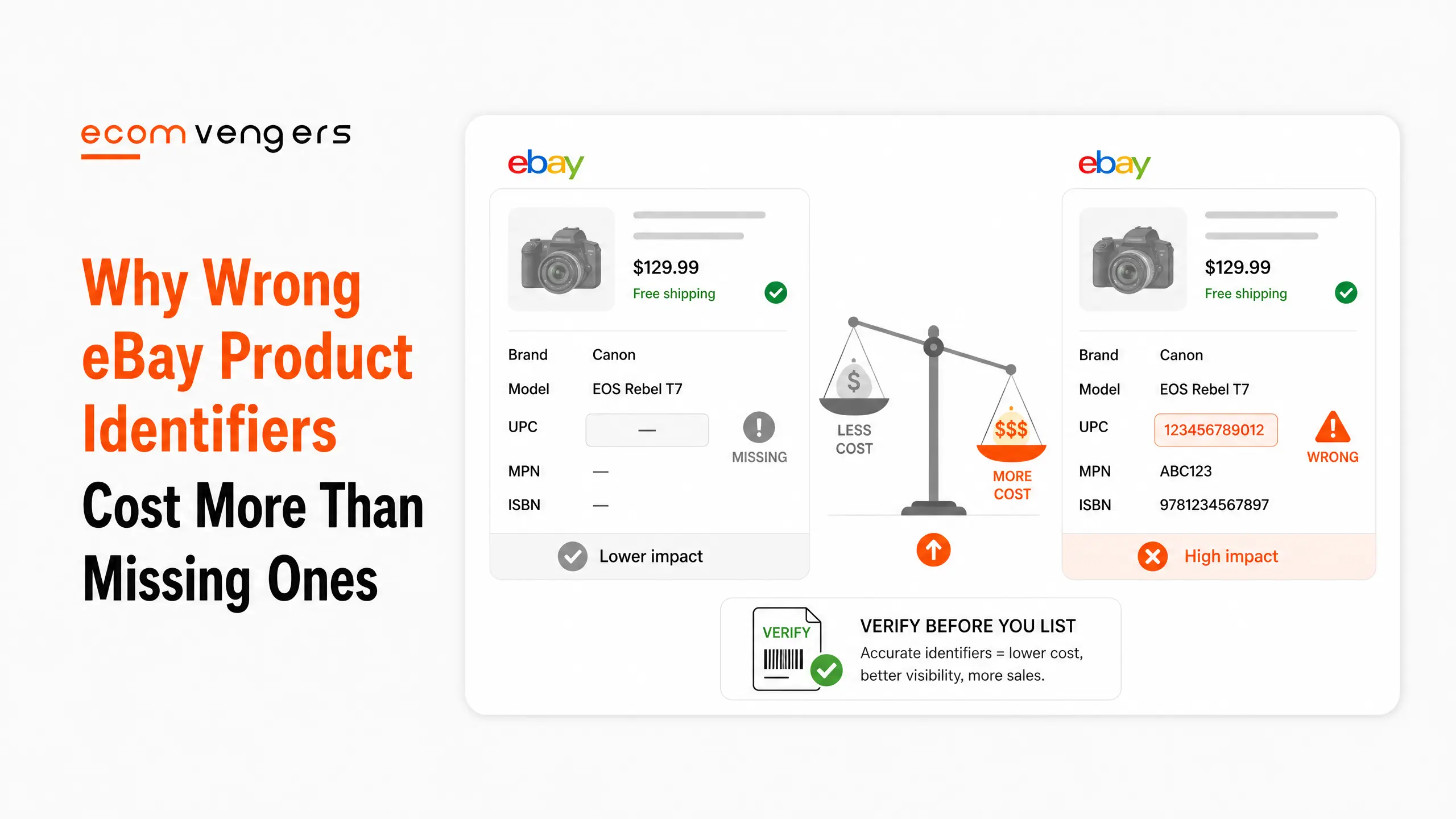
A missing product identifier costs you visibility.
The wrong one costs you the sale, the return and the metric that follows it.
eBay is direct about this. Only use product identifiers that exactly match the product you are selling, because a model from a different year or with different specifications risks misleading buyers.
Misleading a buyer has a name on your dashboard, and it is not a gentle one.
Here is when eBay product identifiers are required, what the catalogue fills in for you, and the one thing it fills in that you must replace.
Key Takeaways
- They are required in most categories. eBay states that plainly.
- They are manufacturer codes. eBay names UPC, SKU, ISBN and MPN.
- Which type applies depends on the category. There is no single universal code.
- A match pre-populates your listing. Photo and title among other fields.
- Never take the stock photo on a used item. eBay forbids that separately.
- Close enough is not allowed. A different year or specification risks misleading buyers.
- The right entry reduces returns. eBay says buyers can be sure what they are buying.
- Not every product has one. Antiques are eBay’s own example.
- Does not apply is a legitimate answer. Where no identifier exists, select it.
- No catalogue match is fine too. Pick a category and build the listing manually.
- Go back and fill the gaps. eBay calls that the best way to future proof your listings.
- They pair with item specifics. eBay treats the two together as the most important thing.
What eBay Product Identifiers Are
Codes the manufacturer created, not ones you invent.
eBay defines them as unique codes created by the product manufacturer that identify a specific product. It says they work like barcodes, and names four types.
Universal Product Codes, Stock Keeping Units, International Standard Book Numbers and Manufacturer Part Numbers. Which one applies varies by the category you are selling in.
So there is no single code to learn. The listing form tells you which the category wants.
Why they exist at all
To let two listings of the same object be recognised as the same object.
eBay puts the benefit simply. Product identifiers give buyers a way to easily find and compare what is available, while knowing your product is exactly what they were looking for.
Find and compare. That second word is the one sellers dislike and buyers rely on.
eBay calls increasing the chance of a buyer finding your item the biggest benefit of adding them.
When Are eBay Product Identifiers Required?
In most categories, which is a broader answer than most sellers expect.
eBay states that product identifiers are required when you are listing in most categories, and points to a published list of qualifying and required categories.
Two escape routes exist, and both are legitimate rather than loopholes.
Where a product genuinely has no identifier, eBay gives antiques as its example, you select Does not apply. Where the catalogue holds no match, you select a category and build the listing manually.
Neither is a failure. Both are the correct answer to a real situation.
Does not apply is not a default
It is an answer, and sellers use it as a way of skipping the question.
eBay addresses that directly. If you selected Does not apply or did not have the identifier handy, it says it is well worth going back to fill them in, and calls that the best way to future proof your listings.
Future proof is the operative phrase. Requirements tighten over time, and a listing built on a real code survives that.
Where Do You Find a Product Identifier?
Usually on the object, sometimes on the box, occasionally nowhere at all.
On the packaging
Anything still boxed hands you the barcode without any research.
Scan or type the digits under the bars and the listing form does the rest. This is why new stock is quick to list and second hand stock is not.
Keep the boxes until the item sells, or photograph the barcode before you recycle them.
On the item itself
Part numbers live in unglamorous places.
Underneath, inside a battery compartment, on a care label, along an edge, or moulded into plastic. Books carry an ISBN on the back cover and usually on the copyright page too.
Five minutes with a torch beats an hour of searching the internet for a model you are guessing at.
And when you still cannot find it
Stop, rather than picking something plausible.
eBay is explicit that only an exactly matching identifier should be used. An approximate one carries a real cost, and a blank field carries a much smaller one.
Does not apply exists precisely for this moment.
What Does an eBay Catalogue Match Fill In?
A lot, and this is the part that saves real time.
eBay explains the mechanism. Enter the product identifier and it suggests a match if your product already exists in the eBay catalogue. Where there is a match, many fields such as photo and title are pre-populated.
That is the fastest route to a complete listing, because the catalogue carries structured data eBay already trusts.
The Best Match guidance says the same thing from the other direction, asking for an accurate description using product details from the eBay catalogue wherever you can.
One field you must overwrite
The photo, whenever the item is not brand new.
eBay pre-populates the catalogue image and separately instructs sellers not to use the stock photo as their main picture when using the catalogue, if the item is not brand new.
Those two facts sit on different pages and they collide on every used listing you create.
Take the catalogue data and replace the image with your own. That is the whole rule, and it is the most common thing we fix on catalogue matched listings.
Key point: the catalogue is a starting point rather than a finished listing. It is right about the specification and it knows nothing about the condition of the object in your hand, which is the only thing your buyer is actually risking money on.
What Happens If You Use the Wrong Product Identifier?
This is where a shortcut becomes expensive, and the chain is short.
eBay warns that selecting a product that is slightly different, such as a model from a different year or with different specifications, risks misleading buyers.
A misled buyer opens a return, and the reason they select is that the item did not match the listing.
That return feeds the item not as described rate in eBay service metrics, which is peer benchmarked and can raise your fees.
So an identifier chosen for convenience ends as a line on an invoice, several months later, with nothing obviously connecting the two.
The reverse is also true
eBay puts the upside in the same paragraph as the warning.
Using the correct catalogue entry could help reduce the number of return requests, because people can be sure what they are buying.
Fewer returns protects two metrics at once, since a return that becomes a case also lands on your defect rate. We take that apart in getting off eBay Below Standard.
Accuracy in a code field is worth more than it looks.
How Do You Add Product Identifiers to Live Listings?
eBay recommends going back, and the order of work matters.
Start where the codes are easy
Anything still boxed carries its own barcode.
New stock, books and branded goods with packaging give you the identifier without research. Clear those first, because the time cost per listing is close to zero.
Leave the unmarked and the ambiguous for a session of their own.
Verify before you attach
The temptation on an old listing is to find a code that looks close and move on.
Check the year, the specification and the variant against what is physically in front of you. A wrong code attached during a tidy up is worse than the blank field you started with.
Where you cannot verify it, Does not apply remains the honest answer.
Then check the photo again
Because attaching an identifier can pull catalogue content in behind it.
If your main image has quietly become a manufacturer shot on a second hand item, you have created the exact problem the photo rule exists to prevent.
Check the listing after the edit rather than assuming it saved what you expected.
How a Product Identifier Differs From the eBay Catalogue
Sellers use the two words interchangeably, and the distinction matters when something goes wrong.
An identifier is a code the manufacturer assigned to a product. The eBay catalogue is a database of products that eBay maintains.
Entering the code asks eBay to look in the catalogue. eBay then suggests a match if that product already exists there.
So a real code can exist while a catalogue entry does not, and that is not an error on your part.
Which explains two confusing outcomes
Both come up regularly and both have simple answers.
You enter a valid code and nothing is suggested. That means the catalogue has no entry, so you select a category and build the listing yourself.
Or a match appears that is nearly right. That is the moment to decline it, because eBay warns against a model from a different year or specification.
Nearly right is the expensive option, and it always looks like the convenient one.
Do Bundles and Handmade Items Need Product Identifiers?
The awkward cases, and eBay has already answered them.
Not every product has a product identifier. eBay names antiques, and the same logic covers anything without a manufacturer code behind it.
A bundle is not one of its parts
This is where sellers most often attach the wrong code.
A lot of six paperbacks is not the ISBN of the first one. A console with three games is not the console. Attaching one component’s identifier tells eBay and the buyer that they are buying that component.
That is the misleading listing eBay warns about, arrived at with good intentions.
Handmade and vintage
No manufacturer, so no manufacturer code.
Select Does not apply and put the effort into item specifics instead, since those are the fields carrying the search work on unbranded goods.
An unidentified item with complete specifics still competes. An unidentified item with empty specifics does not appear at all.
Identifiers and Item Specifics Are One Job
eBay refuses to separate them, and neither should you.
It states that together with product identifiers, item specifics are the most important way to help buyers find what they are looking for.
The two do different halves of the same work. An identifier says which product this is. Item specifics say what it is like.
A buyer searching a model number needs the first. A buyer filtering by colour and size needs the second, which we cover in eBay item specifics.
Which is why a catalogue match is worth chasing
It does both jobs in one step.
A matched listing arrives with the identifier attached and a set of structured fields already filled from data eBay trusts. Building the same completeness by hand takes considerably longer.
Then you correct the condition, replace the photo and add anything the catalogue did not know.
Why a Product Identifier Never Describes Condition
An identifier describes what a product is. It says nothing about the state of the one you are holding.
Two sellers can attach the same correct code to a boxed unused unit and to a scratched one missing its cable. Both listings are accurate on identity and wildly different on risk.
The catalogue cannot help with that gap, and the buyer only cares about that gap.
Which is where used listings go wrong
A catalogue match makes a second hand item look factory fresh in about four clicks.
You inherit a manufacturer photo, a clean marketing title and a full specification. Nothing in that set mentions the scratch, and the buyer forms an expectation from all of it.
That expectation is what a not as described return is measuring.
So take the code, take the specification, then do the condition work yourself. Your own photographs, an honest condition note, and the flaws described in words.
What Product Identifiers Will Not Do for You
Worth being straight about, because identifiers get sold as a growth tactic.
They help buyers find and compare. Comparison is the half nobody mentions, and it is not automatically in your favour.
A correctly identified listing sits alongside every other correctly identified listing of the same product. If your price is the highest and your postage the slowest, the code has simply made that easier to see.
Which is an argument for fixing the price, not for hiding from the catalogue.
And they are one factor of seven
Matching a search well is a single input into where you appear.
Popularity, price, listing quality, completeness, your terms and your track record all continue to run. A perfect identifier on a poor listing is still a poor listing.
We set the whole list out in how eBay Best Match works.
Check Product Identifiers Every Quarter
Same visit as the item specifics check, because the two share a queue.
Pull the listings carrying Does not apply and ask whether that was honest or convenient. New stock arriving since the last round is usually where the easy wins are.
Then spot check a handful of catalogue matched listings and confirm the main image is still yours.
Three jobs, one sitting, and none of them needs a tool you do not already have. Put it beside the item specifics round rather than treating it as separate work, because the same listings usually need both.
Frequently Asked Questions
What are eBay product identifiers?
Unique codes created by the manufacturer that identify a specific product. eBay says they work like barcodes and names UPC, SKU, ISBN and MPN as examples.
Are they compulsory?
In most categories, yes. eBay publishes a list of qualifying and required categories, and the listing form tells you which code that category wants.
What if my item has no identifier?
Select Does not apply. eBay gives antiques as its example of a product that genuinely has no code.
Can I use a code from a similar model?
No. eBay warns that a model from a different year or with different specifications risks misleading buyers, which is how a shortcut becomes a not as described return.
What happens when the catalogue finds a match?
eBay pre-populates many fields, including the photo and title. You then correct anything specific to your actual item.
Can I keep the catalogue photo?
Only on a brand new item. eBay instructs sellers not to use the stock photo as the main picture when the item is not brand new, so a used listing needs your own image.
What if there is no catalogue match?
Select a category and create the listing manually. eBay treats that as a normal path rather than an error.
Do identifiers help buyers compare me with rivals?
Yes, and eBay says so openly. They give buyers a way to find and compare what is available, which cuts both ways if your price is uncompetitive.
Is it worth adding them to old listings?
eBay says it is well worth the time, and calls it the best way to future proof your listings. Requirements tighten, and a real code survives that.
Is an SKU really a product identifier?
eBay lists it among them, alongside UPC, ISBN and MPN. In practice the code a category demands is the one the listing form asks you for.
Will adding one lift my ranking on its own?
It improves how well you match a search, which is one of seven factors in eBay Best Match. Price, popularity and your seller record still decide the rest.
Can I use one code for a bundle or job lot?
No. Attaching one component’s code tells buyers they are purchasing that component. Select Does not apply and invest the effort in item specifics instead.
I entered a valid code and got no match. Why?
The catalogue simply holds no entry for that product. eBay treats this as normal and tells you to pick a category and create the listing manually.
Does the wrong code affect my seller level?
Indirectly, through the returns it causes. A not as described return feeds your service metrics, and one that becomes an unresolved case reaches your defect rate too.
Does the code tell buyers the condition?
No. An identifier says which product it is and nothing about the state of yours. Condition, photographs and the flaws you name are entirely your responsibility.
Should I add codes before or after item specifics?
Codes first where a catalogue match exists, because the match fills several specifics for you. Then complete whatever it left blank.
When should I bring in help?
When thousands of live listings carry Does not apply and somebody has to verify each code against the actual stock. That is the work our eBay SEO service does at catalogue scale.
Right Code, Own Photo
Product identifiers are the rare piece of listing admin that pays immediately and costs nothing.
First, add real codes wherever the packaging gives you one for free.
Second, verify the year and specification before you attach anything to an old listing.
Third, replace the catalogue photo on anything that is not brand new.
Then leave Does not apply where it is honest, and stop using it where it is lazy.
Sources
Documented catalogue and visibility work sits in the case study archive. More on listings and search across the rest of the EcomVengers blog.
Two rules cover almost every identifier decision.
First, supply the identifier when the product genuinely has one. It links your listing to the catalogue entry buyers and search engines already recognise.
Second, never supply one you have not verified. A wrong identifier attaches your item to somebody else’s product, and that is worse than leaving the field alone.
Worth holding on to: missing is a gap and wrong is a claim. eBay treats the two very differently, and so do the buyers who receive the item they thought they ordered.
Sources
- eBay Seller Center, Product identifiers, on UPC, EAN, ISBN and MPN, and on matching the exact product you are selling.
- Guidance in Listing best practices, on identifiers improving search visibility and auto-filling listing details.
- Ranking context sits in Optimising your listings for Best Match.
- Our own figures come from published client cases with the eBay messages attached, collected in our eBay case study library.

Ali Khan is the eBay SEO expert at EcomVengers. He writes our guides on how Best Match ranks listings, and on the titles, item specifics, photos and descriptions that decide whether a buyer ever finds a listing. His side of the work starts once an account is safe: getting its listings seen and sold.
View all posts by Ali Khan