
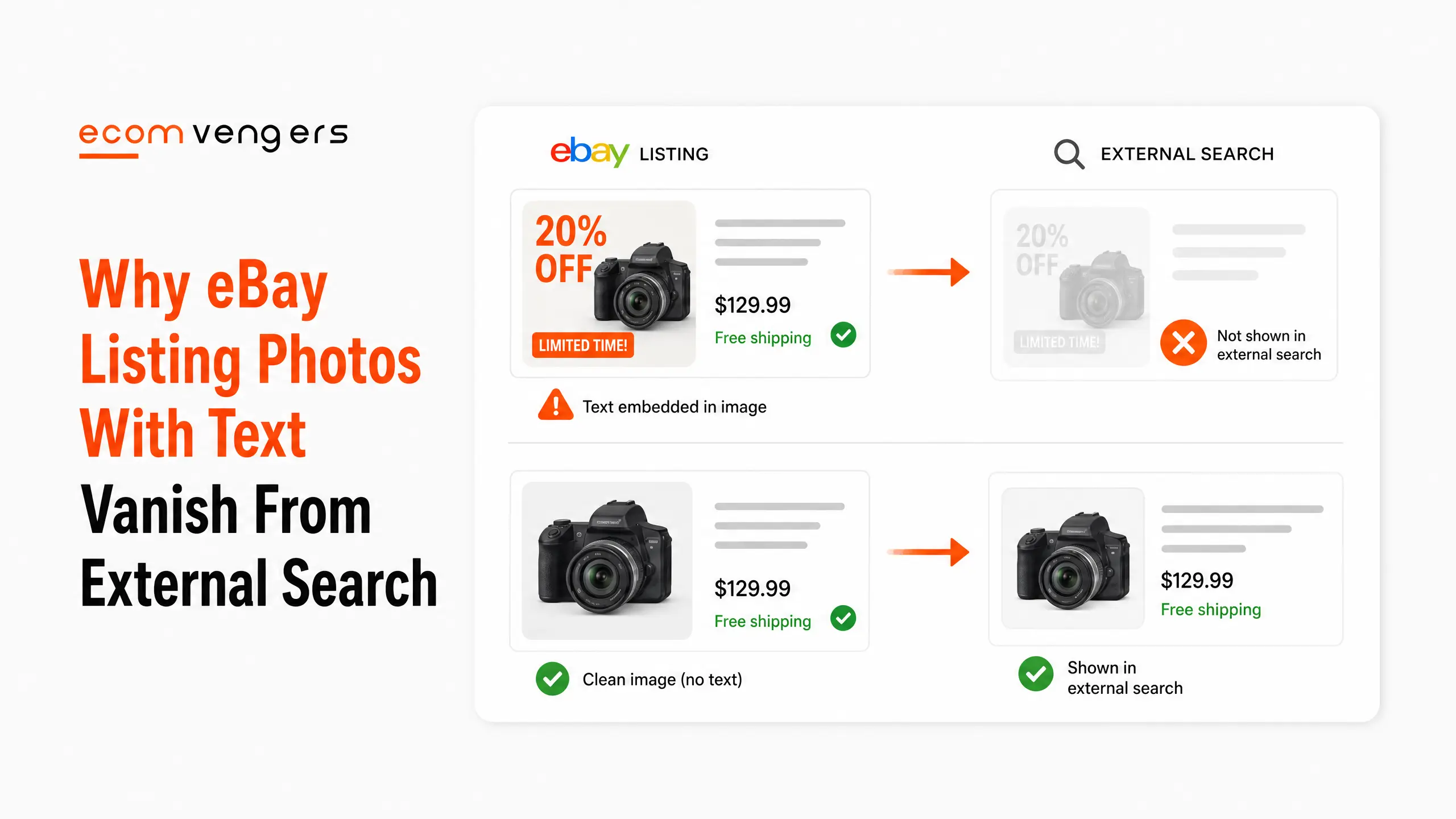
The price flash on your main image is costing you distribution.
eBay does not frame the no text rule as a matter of taste. It says adding text, artwork, logos or watermarks can prevent your images from showing up in third party search results.
Not ranked lower on eBay. Missing from the search results that happen somewhere else.
That is a very different cost to an ugly listing, and almost nobody selling on eBay has been told about it.
Here is what eBay listing photos actually need, in eBay’s own numbers.
Key Takeaways
- Text on an image can block external search. eBay states this outright.
- The minimum is 500 by 500 pixels. eBay recommends at least 1600 by 1600.
- You get 24 photos per listing. eBay says more is more.
- Your first photo appears in search results. It is the only one most buyers ever see.
- Centre the item and fill the frame. Fully visible in that first shot.
- Photograph every item individually. Not a stock shot standing in for yours.
- Show the wear and tear deliberately. eBay asks for closeups of blemishes and damage.
- Use a white or neutral background. Uncluttered, so the item stands out.
- Avoid flash and filters. Bright overhead light instead.
- Show only the variant being sold. A specific instruction for multi variant items.
- eBay ships a background removal tool. It sits in the mobile app.
- Use AI backgrounds sparingly. eBay says a few photos only.
What eBay Listing Photos Are Actually For
Three jobs, and eBay separates them cleanly.
Getting found, because high quality photos are key to showing up in searches on eBay and on external sites like Google Shopping. Boosting sales, by showing buyers exactly what they are getting. And reducing returns, because photos showing all the details leave buyers happier with what arrives.
That third one is the reason a photography session belongs in a performance conversation.
A return you prevented never becomes a case, and a case is what damages your seller level. We take that chain apart in getting off eBay Below Standard.
Why Text on an eBay Photo Blocks External Search
Because the image stops qualifying for the feeds that carry it off eBay.
eBay’s instruction is to avoid graphics or watermarks, and not to add text, artwork, logos or watermarks to your photos. The stated consequence is that it can prevent your images from showing up in third party search results.
Read that against the first benefit on the same page, which names external sites like Google Shopping.
So the banner reading FREE POSTAGE is not merely tacky. It is a decision to sit out a distribution channel you were being given for nothing.
What counts as text on a photo
More than sellers assume, and the list is eBay’s.
Text, artwork, logos and watermarks. That covers price flashes, sale starbursts, your shop logo in the corner, a border with your brand colours, and the copyright watermark people add to stop image theft.
The watermark case is the painful one, because the motivation is reasonable and the cost is real.
Protect your images with better photography rather than with an overlay that removes them from a feed.
What Are eBay’s Photo Size Requirements?
Two numbers, and the gap between them is where the zoom lives.
eBay states that images need a minimum resolution of 500 by 500 pixels, and that it recommends at least 1600 by 1600.
The minimum gets your listing published. The recommendation is what makes it useful to a buyer trying to inspect a scratch before spending money.
eBay pairs the numbers with a plainer instruction. Make sure your photos do not appear blurry or pixelated.
Why the larger size matters on a phone
A buyer on a small screen cannot pick an item up.
Zooming into a photograph is the only inspection available to them, and a 500 pixel image gives them almost nothing to zoom into. Every question that inspection would have answered arrives as a message instead, or as a return.
Modern phone cameras clear 1600 pixels without you doing anything, so this is usually a question of not shrinking images rather than of buying equipment.
Your First eBay Photo Is the Only One Most Buyers See
eBay says so directly, and it changes how you should choose it.
Your first photo appears in search results. Make it your best shot, with the item centred and fully visible.
That thumbnail is competing against every other thumbnail on the page, at about the size of a postage stamp, while a buyer scrolls.
Which rules out the artful angle, the lifestyle shot with the item in the corner, and the close crop that looks striking at full size and unreadable small.
Centre it and fill the frame
eBay asks for the item centred, filling the frame as much as possible.
Empty space around an object is wasted thumbnail. At search result size, an item occupying a third of the frame is barely identifiable, and identification is the entire job of that image.
Test it by shrinking the photo on your own screen until it is thumbnail sized. If you cannot tell what it is, neither can anybody else.
Show only the variant being sold
A specific eBay instruction, and a common way to create a return.
For items with multiple variants, eBay says to show only the variant that is being sold. A photograph of all five colours on a listing for the blue one tells a buyer they might receive any of them.
They will pick the colour they wanted, and the arrival of a different one becomes a not as described return.
How Many eBay Photos Should You Upload?
Considerably more than you are using now.
eBay allows up to 24 per listing and puts it bluntly. More is more when it comes to photos.
It then tells you what to fill them with. All sides of the item, full view and closeups of textures, tags, labels and other key details, plus closeups of blemishes, damage or wear.
Most listings we audit use four. The other twenty are free and already paid for.
Photograph the damage on purpose
The instinct is to hide it, and the instinct is expensive.
eBay asks for closeups of blemishes, damage or wear alongside the flattering shots. A clearly photographed scratch loses you the buyers who would have returned the item anyway.
An unphotographed one loses you the same buyers later, with a case attached.
Key point: photographs are the only listing element that improves visibility and reduces returns at the same time. eBay lists both effects on the same page, which is more than it claims for almost anything else you can change.
Photograph Every Item Individually
eBay puts this as a principle rather than a rule, and it matters most on used stock.
Your items are unique, so your photos should be too. Photograph each item you are selling individually to capture its unique details.
Reusing one shot across five similar items means four buyers receive something that does not match what they saw.
It also collides with the catalogue rule we cover in eBay product identifiers, where the stock image must be replaced on anything that is not brand new.
Lighting and Background for eBay Photos
eBay gives four instructions here and none of them needs equipment.
Keep the background uncluttered
Photograph items in an uncluttered space against a white or neutral background, so they stand out.
A kitchen worktop with a kettle behind it costs you nothing in fees and a great deal in credibility. The buyer is trying to assess an object and half the frame is your house.
A sheet of white card propped against a wall solves this permanently for under a fiver.
Avoid flash and filters
eBay asks for bright overhead lighting, and says to avoid using flash or adding filters.
Both distort colour, and colour is the thing buyers complain about most often after size. A filtered photograph of a navy jacket that arrives looking black is a not as described return waiting to be opened.
Daylight near a window beats every setting on the phone.
The eBay Background Removal Tool
eBay ships this inside the mobile app, and most sellers have never opened it.
It replaces the background of a photo you have already taken, which removes the argument about not owning a studio.
The route is short. From the Selling tab, choose List an item or edit an existing one, upload the photo, use the background removal tool to delete the original backdrop, then pick a replacement and apply it.
Three background options, in order of safety
eBay ranks them itself, more or less.
- White. eBay calls a plain white background always a safe choice, letting the item take centre stage.
- Studio colour. Solid studio inspired shades, which eBay suggests where a light coloured item would not stand out against white.
- AI generated scene. Backgrounds showing the environment an item might be used in.
eBay attaches a caution to the third one. Use it for a few photos only, and make sure the background does not distract from the item.
That is sensible advice for a feature that is fun to overuse. An AI kitchen behind a second hand blender is a mood board, not evidence.
Keep the honest shots too
A replaced background is a presentation choice, not a description.
Use the tidy version as your first photo and keep the plain unedited shots of wear, tags and damage further down. Those are the images that defend you when somebody claims the item was not as described.
Presentation sells it, and evidence keeps it sold.
A Reusable eBay Photo Shot List
Built from what eBay names, and it takes about four minutes an item once it is habit.
- The hero shot. Centred, filling the frame, on a plain background.
- Front, back and both sides.
- Top and underside, where either tells the buyer anything.
- Closeups of texture and material.
- Tags, labels, serial numbers and model plates.
- Every blemish, scratch and worn edge, individually.
- What is actually in the box, laid out together.
Seven shots on a simple item, twelve on a complicated one, and you are still nowhere near the 24 you are allowed.
The last item on that list prevents more disputes than the rest combined, because missing accessories are the most common gap between expectation and parcel.
Reshooting an Existing eBay Catalogue
Nobody reshoots a thousand listings, so the order matters more than the ambition.
Start with the images carrying text
These are the only ones with a stated distribution cost attached.
Anything with a price flash, a shop logo, a border or a watermark is potentially outside third party search results. Removing the overlay is usually a crop or a re-upload rather than a reshoot.
That makes it the fastest win on the list, and it needs no camera at all.
Then fix first photos on your best sellers
Sort by revenue and work down until you get bored.
The first photo is the one eBay puts in search results, so improving it on twenty high traffic listings beats improving every photo on twenty listings nobody sees.
You are buying clicks on impressions you already have.
Then add depth where returns are happening
Photo depth is a returns tool as much as a sales tool.
Pull the lines producing not as described returns and look at how many photos each carries. Thin galleries and vague condition shots turn up disproportionately.
Adding the missing angles there protects the metric we cover in eBay service metrics, which is peer benchmarked and can raise your fees.
Everything else can wait for the next quiet week.
Where eBay Listing Photos Fit in Ranking
Inside one of the seven factors, and adjacent to two others.
Photos sit inside listing quality, which eBay names as a Best Match factor alongside the description. Good ones also feed how complete the listing looks and how buyers behave once they arrive.
The full list is in how eBay Best Match works.
What photos cannot do is rescue a price nobody wants to pay, or an account carrying a damaged track record.
One more habit worth building. Shoot the whole batch in a single session, in the same spot, with the same settings.
Consistency across a store reads as competence to a buyer scrolling your other items. Mixed lighting and shifting backgrounds read as a hobby, even when every individual photograph is fine.
Sellers who batch this way also finish faster, because the setup cost lands once instead of forty times.
What eBay Listing Photos Cannot Fix
Worth saying plainly, because photography gets sold as a cure for flat sales.
Better images earn the click and set the expectation. They do not change what the item is worth, and they do not repair an account that has slipped.
A beautifully shot listing priced above the market still loses to a plain one priced correctly. Price and popularity are separate Best Match factors, and no photograph moves either.
And they cannot outrun a damaged account
Your track record sits in the ranking formula regardless of how the listing looks.
Where a seller level has dropped, eBay applies a placement penalty on top of whatever the images are doing. Reshooting the catalogue in that situation is effort spent on the wrong problem.
Fix the account first, then the photographs. That order is set out in getting off eBay Below Standard.
Photographs are still the cheapest lever available, and cheapest is not the same as largest.
How to Tell Whether Your eBay Photos Are Working
Two numbers separate a photo problem from every other kind.
Impressions high, views low
That is the thumbnail failing, and almost nothing else.
Buyers are being shown your listing and choosing something else from the same results page. They have seen a small image, a title and a total price, and one of those three lost.
Change the first photo alone and watch for a fortnight before touching anything else.
Views healthy, returns rising
That is the gallery failing rather than the thumbnail.
Buyers are arriving, buying, and finding something the photographs never showed them. Thin galleries and hidden wear produce exactly this pattern.
The fix is more images rather than better ones.
Change one thing at a time in both cases, because running a thumbnail change and a gallery expansion together tells you the listing improved without telling you which change did it.
Frequently Asked Questions
What size should eBay listing photos be?
At least 500 by 500 pixels, which is eBay’s stated minimum. It recommends at least 1600 by 1600, which is what gives buyers a usable zoom.
How many photos can I add to an eBay listing?
Up to 24, and eBay encourages you to use them. Most listings stop at four and leave twenty unused.
Can I put my logo or a watermark on eBay photos?
No. eBay says not to add text, artwork, logos or watermarks, and warns it can prevent your images appearing in third party search results.
Which photo shows in eBay search results?
The first one. eBay tells you to make it your best shot, with the item centred and fully visible.
Should I photograph damage on a used item?
Yes. eBay asks for closeups of blemishes, damage or wear. Hiding them converts buyers who would have passed into buyers who return.
Can I use one photo for several identical items?
eBay asks you to photograph each item individually, because your items are unique and your photos should be too. On used stock the differences are exactly what buyers are judging.
Is a white background required?
Not required, but recommended. eBay asks for an uncluttered space and a white or neutral background, and calls plain white always a safe choice.
Should I use the AI background feature?
Sparingly. eBay says to use it for only a few photos and to make sure the background does not distract from the item.
Do photos affect returns?
eBay lists reducing returns as one of three benefits, on the basis that photos showing all the details leave buyers happier with what arrives.
Can I use flash?
eBay says to avoid flash and filters, and to use bright overhead lighting instead. Both distort colour, which is a common source of disputes.
What about items sold in several colours?
Show only the variant being sold. A photograph of the full range on a listing for one colour invites a buyer to expect whichever they preferred.
Does removing a watermark really help?
eBay states that text, artwork, logos and watermarks can prevent images appearing in third party search results, so removing them restores a route you were otherwise closed out of.
Which photo should I change first?
The first one, on your highest revenue listings. It is the thumbnail eBay shows in search, so it earns clicks on impressions you already have.
Do better photos improve my seller level?
Indirectly. eBay lists reducing returns as a benefit, and a return you prevent never becomes the case that damages your level.
When should I bring in help?
When a catalogue of thousands needs reshooting and nobody can take it off the packing bench. That kind of bulk listing work is what our eBay SEO service handles.
Take the Twenty Photos You Already Paid For
Photography is the cheapest listing improvement available, and the one sellers postpone longest.
First, strip the text, logos and watermarks off your images, because they may be costing you external search.
Second, fix the first photo on your best sellers, since that thumbnail does all the work.
Third, shoot the damage deliberately and stop paying for it in returns.
None of that needs a studio. It needs a window, a sheet of card, and four more minutes an item.
Sources
Documented listing and visibility work sits in the case study archive. More on listings and search across the rest of the EcomVengers blog.
Three habits produce better photographs than any equipment upgrade.
First, shoot the first image for the search results rather than the listing page. It is the thumbnail that earns the click, and everything else is read afterwards.
Second, keep the frame clean. Text, logos and watermarks can stop an image reaching third party search, which is a distribution cost rather than a style one.
Third, photograph the faults deliberately. A visible scratch prevents a case, and a hidden one produces a return with your name on it.
Worth holding on to: photographs decide whether a buyer trusts what arrives. Getting them right is cheap, and getting them wrong is a returns problem you pay for twice.
Sources
- eBay Seller Center, Take great photos, for the 500 by 500 minimum, the 1600 by 1600 recommendation, the 24 photo allowance and the rule against text, logos and watermarks.
- Further guidance in Create great listings, on photographs and condition.
- Ranking context sits in Optimising your listings for Best Match.
- Our own figures come from published client cases with the eBay messages attached, collected in our eBay case study library.

Ali Khan is the founder of EcomVengers, the eBay growth and account recovery agency. He has spent the better part of a decade pulling suspended sellers back from MC011 and MC999 notices, repairing wrecked defect rates, and turning buried listings into ranked ones. When eBay's villains show up, he is the one sellers call. You handle the millions, he handles the villains.
View all posts by Ali Khan