eBay tells you to use all 80 characters of your listing title.
eBay also says every word must refer only to the item for sale.
Both are true. They sit on different pages, and neither page mentions the other.
So sellers describe the item, run dry at character forty, look at the empty space, and start reaching.
What began as a description ends up reading like a supermarket receipt from a shop you have never visited.
That reach is where a ranking tactic turns into a policy breach, and this particular policy ends its list of consequences with account suspension.
Rebuilding catalogues after a title strike is regular work on our desk, and eBay suspension removal is where those cases usually arrive. We quote the eBay policy wording directly, so you can check it instead of taking our word for it.
Six traps. All of them on one page nobody reads.
Key Takeaways
- eBay matches a buyer search against listing titles first, so the title decides whether you are in the running at all.
- You get 80 characters, and eBay tells you plainly to use as many of them as you can.
- However, every word must refer only to the item for sale. That one line turns a padded title into a violation.
- Brand, model or type, colour, style and model number are the fields eBay names as belonging there.
- Comparisons with other products are banned outright, with no qualifier attached.
- Question marks are not allowed in keywords, so an unknown detail should be left out.
- Special characters cost you policy risk and characters at the same time.
- One listing cannot offer a choice of products, whether that means two models or two conditions.
- Compatible vehicles must go in the parts compatibility guide, not the title.
- Fits, for and compatible with are allowed, except before brand names in jewellery, clothing and accessories.
- eBay names four possible responses, including account suspension, and promises no order between them.
- Seller Help is where eBay says any flagged policy issue on your listings will appear.
What eBay Does With Your Listing Title
It matches the title against what the buyer typed, before it looks at anything else.
eBay puts it in one sentence in Seller Center: when a buyer searches for an item, the system finds the listing titles that closely match. So the title is not a headline in the magazine sense. Instead it is the index entry.
That distinction matters because it changes what a good title looks like. A headline is written to be enjoyed. An index entry is written to be found, and then to be understood in the half second before someone scrolls past.
Your title therefore does two jobs at once. First it has to contain the words a buyer would type. Second it has to read like a description of a real object, not a pile of keywords.
Most sellers manage the first job and fail the second. Some manage the second and never get seen. Getting both right is the whole exercise, and the rest of this article is about how the two pull against each other.
The 80 Character Rule eBay States Plainly
Eighty characters, and eBay’s own advice is to use as many as you can.
That advice appears twice. It sits on the page about creating listings, and it appears again in the electronics guidance, where eBay tells sellers to use all 80 characters and focus on relevant keywords.
So the instruction is not ambiguous. Short titles waste a field that eBay is telling you to fill.
Yet plenty of sellers read that as permission to pad. They finish describing the item at character forty, notice the empty space, and start reaching for words that might pull traffic. That is exactly where accounts get into trouble, because the policy that governs titles has a rule the Seller Center page never repeats.
Filling 80 characters is only correct while the words remain true of the item. Once they stop being true, the same instruction becomes a trap.
Key point: eBay tells you to use all 80 characters. It also says every word must refer only to the item for sale. The second rule is the limit on the first.
Where 80 eBay Title Characters Actually Go
Measure a real title and the space stops feeling generous.
The example above comes from eBay itself, and it runs to 65 characters. Brand, model, capacity, colour, lock status and condition grade all fit, with fifteen characters spare.
Notice what is absent. There is no adjective, no punctuation and nothing about postage. Every word is a thing a buyer might type into the search box, which is the only test that matters here.
Those fifteen spare characters are the interesting part. eBay would rather you spent them on another genuine attribute, such as a storage size, a model number or a specific finish. Sellers who instead reach for filler are the ones who end up in the policy.
What Belongs in an eBay Listing Title
Brand, model or type, colour, style and the model number. That is eBay’s own list.
Two of eBay’s published examples show the pattern clearly. One reads: Ann Taylor Women’s Sweater 100% Cotton Black Yellow Sleeves Size 6. The other reads: Nike Boys Blue Lace-Up Sneakers Size 3 AB0011-234.
Look at the order. Brand comes first, then the item type, then the attributes that separate this one from every other one. Size lands near the end, and the model number sits last.
That ordering is not accidental. Search results truncate on narrow screens, so the words that identify the item need to survive the cut. Meanwhile the model number is precious for the small number of buyers who search by it, and useless to everyone else, which makes the end of the title the right home for it.
One more thing belongs there, though sellers often forget it. If your item is commonly known by two names, put both in. A buyer searching for a pushchair and a buyer searching for a stroller want the same object, and only one of them will find you otherwise.
Where the Words in an eBay Title Should Come From
Most sellers pick title words from memory. eBay publishes a list instead, and it changes by category.
Its guidance names the item specifics it recommends for each one. For a phone that means network, screen size, lock status and connectivity. For a laptop it means model, RAM size, processor and storage type.
Treat it as a shortlist, not a checklist. Eighty characters will not hold the lot. Take the attributes a buyer narrows by, and leave the rest to the item specifics fields.
eBay puts the aim plainly. Use all 80 characters, and focus on relevant keywords.
Its own phone example follows that shortlist. Apple iPhone 11 Pro 256GB Midnight Green Carrier Unlocked Grade A.
Read the parts. Brand, model, storage, colour, lock status, grade. Nothing decorative, and nothing that is not part of the object.
Why the list beats guessing
Two reasons. It mirrors the filters buyers are given in that category. It also keeps the title in step with the item specifics that decide your visibility.
So a title built from the list repeats your structured data. A title built from memory tends to miss the one attribute buyers filter on most.
Key point: read the recommended item specifics before you write the title, not after. That list names the words a buyer is handed to filter with.
Six Ways an eBay Listing Title Breaks the Search Manipulation Policy
All six count as keyword stuffing in eBay’s eyes, they come from one policy page, and most sellers have never read it.
1. Words that are not about the item you are selling
The policy states that all the words in the listing need to be accurate and refer only to the item for sale. Adding popular keywords with no relation to your item is the definition of search manipulation in eBay’s own wording.
So a plain cotton dress does not get to mention a designer it has nothing to do with. Nor does a phone case get to list six handsets it does not fit.
2. Comparisons with other products
Listings that make comparisons with other products are not allowed. Full stop, no qualifier.
That rules out the whole family of phrasings sellers love. Similar to, better than, same as, like the one from a famous brand. Each of them borrows a search term that belongs to someone else, which is precisely the behaviour the policy exists to stop.
3. Question marks and details you are unsure about
Titles cannot include keywords with question marks, because eBay treats that as misleading. If a detail is unclear or unknown, the policy says to leave it out of the listing entirely.
Sellers usually mean well here. They are hedging on a model year they cannot confirm. Still, a hedge in a title reads to the system as a keyword you have no right to, so the honest move is silence.
4. Special characters used to grab attention
eBay’s listing guidance says to avoid special characters and irrelevant words. Asterisks, rows of exclamation marks and the old L@@K trick all qualify. That last one peaked somewhere around the polyphonic ringtone, and it has aged about as well.
Besides the policy risk, they cost you real estate. Every symbol is a character not spent on a word somebody might search for.
5. One listing offering a choice of products
Offering a choice of different products in a single listing is not allowed. eBay gives two examples: different brands or models together, such as an iPhone 6 and an iPhone 7, and items in different conditions sold as new or used from the same listing.
In a title it shows up as a slash, or the word or, doing the work of a whole product range. Once you spot the pattern you will find it everywhere, rather like a squeaky door.
The fix is structural rather than verbal. List identical items as one multi quantity fixed price listing, and list genuine variants such as size or colour using a variation listing, which eBay names as the way to reach the best position in Best Match.
6. Vehicle compatibility written into the title
Parts sellers get a rule of their own, and it is unusually blunt. Items that fit multiple vehicles belong in the parts compatibility guide, and compatible vehicles should not be included in the listing title.
A fitment list will eat all 80 characters and ask for seconds, which makes this the most common breach in motors categories by a distance. The compatibility table does the job better anyway, because it filters.
Note: the parts compatibility guide is not a weaker version of the title. It filters. Buyers narrowing by vehicle find you there, which a title full of model years never manages.
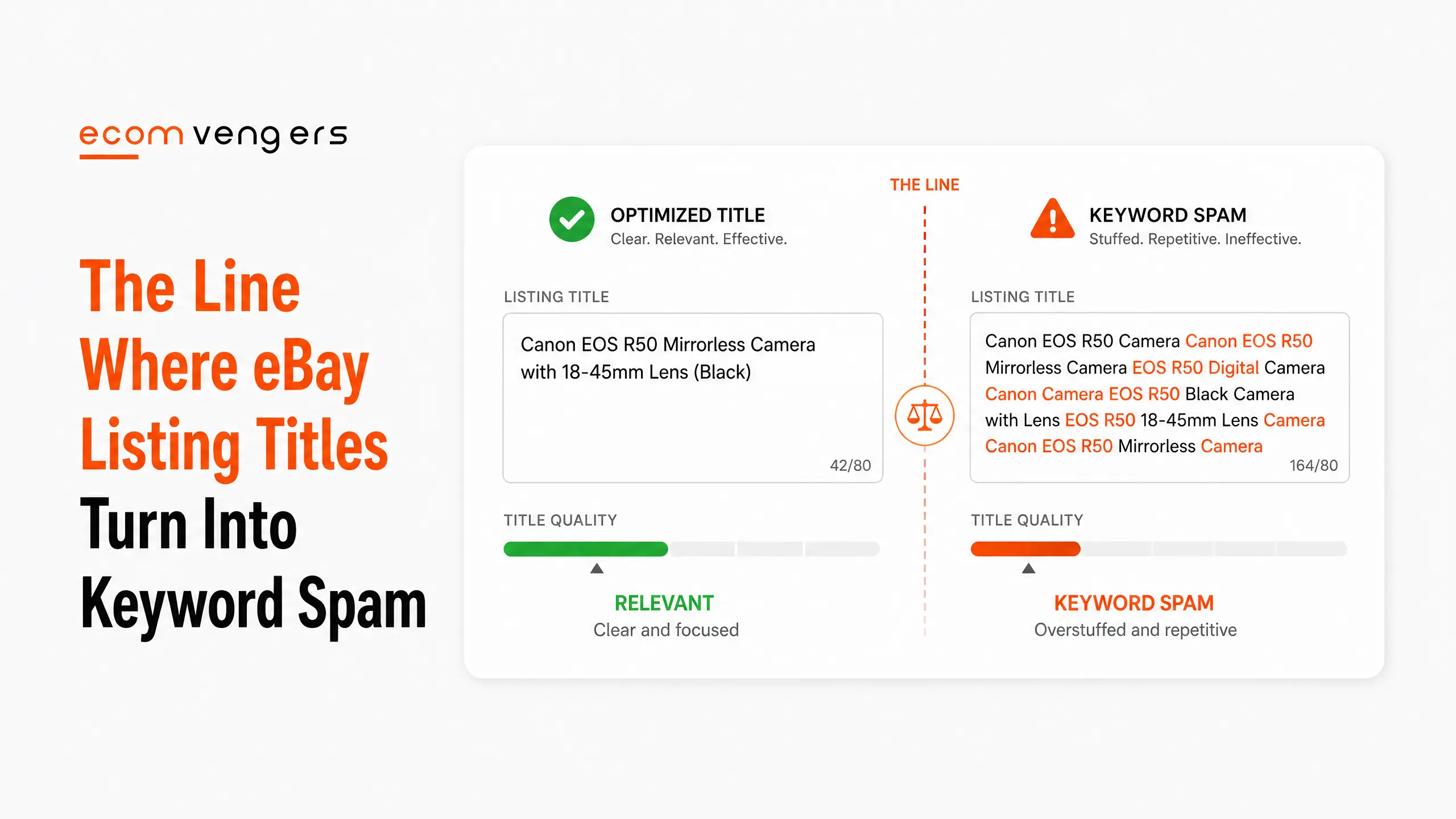
One eBay Listing Title, Marked Up Word by Word
Rules are easier to see when someone breaks them in front of you.
The first thirty eight characters are fine. Brand, item type, colour and size are all true of the object, and a buyer could type any of them.
Everything after that is doing something else. Two competitor brands are there to catch searches the seller has no claim on. An abbreviation replaces a phrase buyers type. Then a symbol and a question mark arrive purely to make the listing shout.
Sellers write titles like this because they feel productive. More words look like more coverage. In practice the extra words attract clicks from people who wanted something else, which drags down the click through and conversion signals that feed eBay Best Match.
So the padding is not merely risky. It actively works against the ranking it was meant to buy.
What eBay Does When a Listing Title Breaks the Policy
It names four possible actions, and the last one ends the account.
Read the wording carefully, because the shape of it matters. eBay says such actions may include, as an example only, removing the listing or other content, issuing a warning, restricting activity or account suspension.
Two things follow from that phrasing. First, the list is explicitly not exhaustive, so other responses are possible. Second, nothing in it promises an order. A seller who assumes a warning always comes first is assuming something eBay never said.
In practice most title problems end at the first rung. A listing disappears, the seller relists it clean, and nothing else happens. Trouble arrives when the pattern repeats across a catalogue, since a hundred padded titles read as a deliberate strategy, not a slip.
That is the case where an eBay account restriction follows, and it is a miserable one to appeal, because the evidence is sitting in your own listings.
Why Fits and For Are Riskier in eBay Titles Than Sellers Think
They are allowed, conditionally, and the condition catches a lot of people out.
eBay’s rule reads like this. If the item is an accessory for, or compatible with, another item, then the words fits, for or compatible with should be stated before the name of that other item.
So a case for a particular phone can say so, as long as the qualifier is there. Writing the handset name bare, with no qualifier, is the version that breaks the rule.
The exception that surprises clothing and jewellery sellers
The qualifier does not rescue you everywhere. eBay says fits, for and compatible with are not allowed before the brand names of jewellery, clothing and accessories, or before universally compatible items.
In other words, a charm cannot be sold as fits a well known bracelet brand, and a generic cable cannot list every device on earth after the word for. Both of those are extremely common, and both are breaches.
Sellers in those categories usually inherit the habit from a supplier’s spreadsheet. The file arrives, nobody reads column D, and the catalogue goes live carrying four hundred small violations in neat alphabetical order.
Where eBay Listing Title Problems Show Up in Your Account
Seller Help is the page eBay points you at, and most sellers never open it.
eBay’s own tip on the policy page says to visit Seller Help for details of any policy issues with your account or listings. So if something has been flagged, that is where it surfaces, along with the information needed to clear it.
Check it before you assume you are clean. A listing that stopped getting impressions has often been hidden, not deleted, and the seller carries on wondering why a good item went quiet.
Watch for two other symptoms. Impressions collapsing on one listing while similar ones hold steady points at that listing specifically. Meanwhile a slow decline across everything usually points somewhere else, such as missing eBay item specifics or a drop in seller level.
How to Rewrite a Whole Catalogue of eBay Listing Titles
Sort by revenue, fix the top hundred, then work down.
Nobody rewrites five thousand titles by hand. So the practical route is to find the pattern that repeats, since bulk problems almost always come from one template or one supplier feed.
Find the repeated phrases first
Export your active listings and search the title column for the usual suspects. Look for question marks, asterisks, the words like and similar, and any brand you do not sell. Our eBay listing title analyser runs those checks on one title at a time and quotes the rule behind each one, which is a quick way to learn what you are searching for.
Then count how many listings each phrase touches. A phrase sitting on four hundred titles is one edit, not four hundred, because the bulk edit tools in Seller Hub handle find and replace across a selection.
Refill the space you just cleared
Deleting filler leaves you short of the 80 characters eBay wants you to use. So put real attributes back in their place.
Your item specifics are the obvious source, since they already hold the material, colour, size and model number in structured form. Pull the two or three that a buyer would search by and add them to the title.
Where the specifics themselves are thin, fix those at the same time. The two fields feed different parts of search, and eBay product identifiers feed a third.
Change titles in batches, not all at once
Rewrite a few hundred, then wait a fortnight and read the impression data before you touch the rest.
Two reasons sit behind that. First, a staged rollout tells you whether the new format helps. Second, it protects you if it does not, because a batch is easy to reverse and a catalogue is not.
A Reusable eBay Listing Title Template
eBay publishes four worked examples for electronics, and the same skeleton fits almost any category.
- Apple iPhone 11 Pro 256GB Midnight Green Carrier Unlocked Grade A
- Dell Desktop Computer 16GB RAM 512GB SSD Card, Intel i5 3.4GHz QuadCore Grade A
- Apple Watch Series 8, 45MM GPS, Space Gray with Black Sport Band, A2289
- Apple iPad Air 4th Gen. 256GB WiFi, Space Gray
Strip those back and one order emerges every time. Brand, then model, then the two or three attributes that separate this unit from the next one, then the condition or grade if it applies.
So the template reads: brand, model, key attributes, condition. Nothing more.
Choosing which attributes make the cut
Pick the ones a buyer would use to narrow a search. For a phone that means storage, colour and lock status. For a jacket it means size, colour and material.
Ignore anything a buyer would never type. Batch numbers, your own stock references and the word stunning all fail that test on the first reading.
Matching the title to the right catalogue entry
Your title and your catalogue match need to describe the same object. eBay warns that choosing a similar but incorrect item version, such as a model from a different year, can mislead buyers.
That mismatch causes returns, and returns cost far more than the visibility the wrong catalogue entry bought you. So check the year, the generation and the region variant before you accept eBay’s suggested match.
How Often Should eBay Listing Titles Be Reviewed?
Once a quarter for the listings that earn the money, and once whenever eBay changes something in the category.
Buyer vocabulary drifts. A model gets a nickname, a colour name catches on, and the phrase people typed last year stops being the phrase they type now. Your title cannot follow that on its own.
So run a short check on your top sellers each quarter. Search the term yourself, look at what the listings above you are calling the same object, and note any word that keeps appearing in theirs and not in yours.
Then apply the same honesty test before you borrow it. If the word is true of your item, it belongs in your title. If it is only true of theirs, leaving it out is not a missed opportunity but a policy you have just avoided breaking.
Category changes deserve their own look. When eBay adds a required item specific, the vocabulary it introduces usually belongs in the title too.
What eBay Listing Titles Cannot Fix
A title decides whether you appear. It does not decide whether you sell.
Once the buyer is looking at your listing, the photographs and the price take over. A perfect title in front of a dark, cluttered photo still loses, which is why eBay listing photos deserve the same attention.
Titles also cannot lift an account that has slipped. Best Match weighs your track record as a seller, so a demoted account carries that weight into every search regardless of how the titles read.
Fix the account first in that situation. The route out is set out in getting off eBay Below Standard, and titles can wait until it is done.
Frequently Asked Questions
Does editing an eBay listing title reset its search ranking?
eBay does not publish an answer, so anyone who states one confidently is guessing. What eBay does say is that live listings missing key details are worth updating, which points the other way.
Should an eBay title repeat words from the item specifics?
Yes, for the attributes buyers search for. Size, colour and model number earn their place in both fields, while warehouse codes and internal labels belong in neither.
Can an eBay title mention another one of my listings?
No. The policy states that listings promoting other listings are not allowed, and your own items get no exemption.
Is a short eBay listing title ever the right choice?
Occasionally, when the item has few attributes. Even so, most short titles are short because the seller stopped early, not because the object ran out of description.
Where can I get help with an eBay title problem?
Seller Help lists anything eBay has already flagged. Where a title pattern has already cost you a restriction, our eBay SEO services team rebuilds the catalogue and the appeal together.
How many characters can an eBay title be?
Eighty. eBay tells you to use as many of them as you can, and to fill them with brand, model or type, colour, style and the model number.
Can I put a competitor brand in my eBay title?
Only where your item relates to it, with the right compatibility wording. Adding a brand you do not sell to catch its searches is what the search manipulation policy calls manipulating search results.
Are question marks allowed in an eBay title?
No. eBay says titles cannot include keywords with question marks, because that misleads buyers. Where a detail is unknown, the policy tells you to leave it out entirely.
Should vehicle fitment go in a parts title?
No. Items fitting multiple vehicles belong in the parts compatibility guide, and eBay states that compatible vehicles should not appear in the listing title.
What happens if eBay decides my title breaks the policy?
It names four possible responses: removing the listing, issuing a warning, restricting activity and account suspension. eBay describes them as examples only and promises no order between them.
Does writing an eBay title in capitals help?
No. Capitals do not change how eBay matches your title to a search, and they make the listing harder to read on a phone.
Can I write free postage in the title?
It wastes characters that could hold a searchable attribute. Postage terms already appear on the listing, so repeating them in the title buys you nothing.
Describe the Object, Then Stop
Eighty characters sounds like a marketing budget. It is closer to a form field.
Four steps, in this order, if you are rewriting titles this week.
First, export your active listings and search the title column for the repeats. Question marks, asterisks, the words like and similar, and any brand you do not stock. One phrase on four hundred titles is a single edit, not four hundred.
Second, delete before you add. Clearing the filler tells you how much room you had to work with, and it is usually more than sellers expect.
Third, refill from your item specifics rather than your imagination. Those fields already hold the colour, the size and the model number in the words buyers type.
Fourth, change a few hundred and wait a fortnight before the rest. A batch is easy to reverse. A catalogue is not.
Keep this in mind while you work: the rule that matters most is not about length at all. Every word has to be accurate and refer only to the item for sale, and no character count will tell you whether yours are. Fill the field with the words that describe your item and nothing else.
If you run out of true things to say at character fifty, that is your answer. Reaching for a rival brand to close the gap turns a ranking problem into a policy one, and the policy ends its list of consequences with account suspension.
Accurate titles rank because eBay wants buyers to find what they searched for. Everything else is friction.
Sources
- eBay Seller Center, Create great listings, for the 80 character guidance and the title examples.
- Search manipulation policy at eBay, for the rules on keywords, comparisons, question marks, mixed listings and vehicle compatibility.
- Listing best practices on eBay Seller Center, for the electronics title examples, the catalogue matching warning, the recommended item specifics by category, and the instruction to use all 80 characters and focus on relevant keywords.
One job to line up next. A title decides whether a buyer clicks, and the photograph decides whether they stay. Ours is free to check a title against every rule on this page at the eBay listing title analyser, which quotes the wording behind each finding.
Where the same pattern sits on a whole catalogue, and it usually arrives from one template or one supplier feed, that rebuild is the work we do. Send us one title and we will tell you how far the problem spreads.

Ali Khan is the eBay SEO expert at EcomVengers. He writes our guides on how Best Match ranks listings, and on the titles, item specifics, photos and descriptions that decide whether a buyer ever finds a listing. His side of the work starts once an account is safe: getting its listings seen and sold.
View all posts by Ali Khan